
Auditing a WordPress website with 100 URLs is one thing. WordPress SEO audit, WordPress website audit, technical SEO audit.
Auditing a website with 8,000+ URLs is a completely different challenge.
On a small website, you can often inspect important pages manually, review the main technical settings, check Search Console, and identify the biggest problems relatively quickly.
Large WordPress websites require a different approach.
The problem is rarely a single catastrophic SEO error. Instead, you may find thousands of URLs created by categories, tags, archives, search pages, pagination, media attachments, filters, parameters, old content, redirects, and other WordPress-generated variations.
A website can therefore have a large number of URLs without having an equally large number of valuable pages.
That is why a large-scale WordPress SEO audit should answer three fundamental questions:
- Which URLs exist?
- Which URLs should exist and be indexed?
- Which problems deserve attention first?
This guide walks through a practical process for auditing a large WordPress website, using an 8,000+ URL site as the working example.
You will learn how to analyze crawling, indexation, duplicate content, thin pages, archives, redirects, internal links, canonical URLs, XML sitemaps, and technical SEO.
More importantly, you will learn how to prioritize the problems you find instead of trying to fix everything at once.
Google’s own documentation emphasizes that meeting technical requirements does not guarantee crawling, indexing, or ranking. SEO is therefore not simply about making a website technically “perfect”; it is about making the site’s important content discoverable, understandable, useful, and accessible to search engines and users.
1. What Is a Large-Scale WordPress SEO Audit?
A WordPress SEO audit is a systematic examination of a website to identify problems that can affect:
- Crawling
- Indexation
- Search visibility
- Organic traffic
- Internal linking
- Content quality
- Site architecture
- User experience
- Technical performance
A large-scale audit takes the same principles but applies them to a much larger URL inventory.
For example, imagine a WordPress website with:
- 1,500 blog posts
- 400 pages
- 3,000 tag URLs
- 1,000 category/archive URLs
- 800 attachment URLs
- 900 redirected or obsolete URLs
- 400 other generated URLs
The website might technically contain 8,000+ URLs, but that does not mean all 8,000 deserve to be crawled or indexed.
This distinction is critical.
URL count is not the same as SEO value.
The first objective of your audit should therefore be to classify the URLs.
A useful classification is:
| URL Type | Typical SEO Value | Action |
|---|---|---|
| Core landing pages | High | Protect & improve |
| High-quality articles | High | Optimize |
| Product/service pages | High | Protect & improve |
| Useful categories | Medium/High | Optimize |
| Useful tags | Sometimes | Evaluate |
| Thin archives | Low | Consolidate/noindex/remove |
| Duplicate URLs | Low | Consolidate |
| Redirected URLs | None as destination | Review redirects |
| Broken URLs | None | Fix where valuable |
| Attachment pages | Often low | Review |
| Internal search URLs | Usually low | Control |
| Parameter URLs | Depends | Control |
The purpose isn’t to reduce the number of URLs simply because a large URL count looks bad.
The purpose is to make sure each important URL has a clear reason to exist.
2. Before You Start: Build Your SEO Audit Data Set
Before analyzing individual problems, collect as much data as possible.
For a large WordPress website, I recommend combining several sources rather than relying on a single crawler.
Core data sources
You ideally want:
- Google Search Console
- Google Analytics 4
- XML sitemap(s)
- robots.txt
- A website crawler
- WordPress database/content information
- Server logs, if available
- PageSpeed/Core Web Vitals data
- Backlink data
The reason is simple:
No single data source shows you the complete picture.
A crawler can discover URLs that Google has never indexed.
Search Console can show URLs and indexing information that a crawler cannot fully explain.
Analytics can reveal pages that receive traffic.
Backlink data can reveal old URLs that still have valuable external links.
Combining the sources gives you a much stronger audit.
3. Step 1: Crawl the Entire WordPress Website
Your first technical objective is simple:
Find out what actually exists.
Do not begin by manually opening pages.
Start with a crawl.
A crawler should ideally collect information such as:
- URL
- HTTP status code
- Page title
- Meta description
- Canonical URL
- H1
- Word count/content length
- Indexability
- Noindex status
- Robots directives
- Internal links
- External links
- Redirect destination
- Crawl depth
- Response time
- Content type
For an 8,000+ URL website, export the crawl data into a spreadsheet or database.
Then start grouping URLs.
Example URL classification
You might discover:
Posts
/blog/how-to-do-seo/
Categories
/category/seo/
Tags
/tag/technical-seo/
Author archives
/author/john/
Date archives
/2025/08/
Pagination
/blog/page/2/
Attachment pages
/sample-image/
Search URLs
/?s=seo
Old URLs
/old-seo-guide/
The first major discovery often comes here:
The website’s URL count may be driven by its WordPress configuration rather than its actual content strategy.
4. Step 2: Compare Crawled URLs With Sitemap URLs
After crawling the website, compare the results with the XML sitemap.
This is one of the easiest ways to identify inconsistencies.
Ideally, your sitemap should primarily contain the URLs you want search engines to discover and consider.
Google describes sitemaps as a way to tell search engines about the URLs you prefer to appear in search results. A sitemap is a hint rather than a guarantee of crawling or indexing.
Look for these situations
Situation A: URL is in sitemap and indexable
Good.
This is generally the type of URL you expect to see.
Situation B: URL is in sitemap but noindex
Potential configuration problem.
Why tell Google about a URL in the sitemap if you simultaneously tell it not to index the page?
Situation C: URL is in sitemap but redirects
Usually worth fixing.
A sitemap should not normally be filled with URLs that immediately redirect elsewhere.
Situation D: URL is in sitemap but returns 404
Definitely investigate.
Situation E: Important page is not in sitemap
Potential discovery/indexation issue.
This doesn’t automatically mean the page won’t rank. Google can discover pages through links and other mechanisms.
But it deserves investigation.
5. Step 3: Analyze Indexation
After understanding what exists, determine what Google actually indexes.
Open Google Search Console and examine the indexing reports.
Your objective is to separate:
URLs that exist
from
URLs Google can crawl
from
URLs Google has indexed
from
URLs you actually want indexed.
These are not the same thing.
Think in four layers
Layer 1 — Exists
The URL can be found somewhere.
Layer 2 — Crawlable
Search engines can access it.
Layer 3 — Indexable
There are no directives preventing indexing.
Layer 4 — Valuable
You actually want this page competing in search.
The fourth layer is the one many audits overlook.
A page can be technically indexable and still have little SEO value.
6. Step 4: Review Robots.txt
The robots.txt file controls crawling access for crawlers.
Check:
/robots.txt
Look for:
- Important directories accidentally blocked
- WordPress admin paths
- Search URLs
- Unnecessary generated URLs
- Sitemap declarations
- Conflicting directives
But be careful:
Robots.txt is not a canonicalization tool.
Google specifically advises against using robots.txt to canonicalize duplicate URLs because Google may still index URLs blocked from crawling without accessing their content.
This is an important distinction.
If your goal is:
“I don’t want Google to index this page.”
robots.txt may not be the correct solution.
If your goal is:
“I don’t want Google to crawl this unnecessary URL.”
then robots.txt may have a role, depending on the situation.
Always identify the actual problem before choosing the directive.
7. Step 5: Find Duplicate URLs
Duplicate content is one of the most common problems on large websites.
And WordPress can create multiple URL variations without the site owner realizing it.
Examples include:
- HTTP vs HTTPS
- www vs non-www
- trailing slash variations
- parameters
- duplicate archives
- attachment pages
- similar category/tag pages
- syndicated or duplicated content
- old URL structures
Google explains that duplicate content is not automatically a spam violation, but duplicate URLs can make it harder to consolidate signals and can cause crawling resources to be spent on URLs that aren’t useful.
How to identify duplicate content
Look for:
- Identical titles
- Identical H1s
- Very similar page content
- Same canonical URLs
- URL variations
- Similar page templates
- Duplicate metadata
A crawler can help identify groups of URLs with high content similarity.
Then determine whether each duplicate should be:
Redirected
Canonicalized
Noindexed
Merged
Deleted
or simply left alone because the duplication is harmless.
8. Step 6: Audit Canonical URLs
Canonical tags are particularly important on large websites because they help communicate which URL represents the preferred version of a page.
For example:
<linkrel="canonical"href="https://example.com/seo-guide/"/>
Google treats redirects and rel="canonical" as strong canonicalization signals, while sitemap inclusion is a weaker signal.
Check for canonical problems
Look for:
- Missing canonical
- Canonical pointing to a redirect
- Canonical pointing to a 404
- Canonical pointing to an unrelated page
- Canonical pointing to a noindex page
- Conflicting canonical signals
- HTTP canonical on HTTPS site
- Canonical inconsistencies across similar URLs
Example
Suppose these URLs exist:
/seo-guide/
/seo-guide/?source=email
/seo-guide/?utm_campaign=test
You generally want the primary page to be:
/seo-guide/
The tracking versions shouldn’t become competing canonical candidates.
Google recommends consistency: internal links should point to the canonical URL, and different canonicalization methods should not send conflicting signals.
9. Step 7: Find Thin Content
Large websites often have a different problem from small websites:
Too many pages with too little value.
A page with a low word count isn’t automatically bad.
A 300-word page can be extremely useful.
A 3,000-word page can be useless.
So don’t create a simplistic rule like:
“Every page under 500 words must be deleted.”
Instead, ask:
Does this page satisfy a real search or user need?
Look at:
- Organic clicks
- Impressions
- Rankings
- Backlinks
- Internal links
- Conversions
- Search intent
- Content quality
- Uniqueness
Then classify the page.
Keep
Useful page with traffic, links, conversions, or clear search value.
Improve
Useful topic but weak or outdated content.
Consolidate
Multiple weak pages targeting the same intent.
Remove
Page has no meaningful purpose and no strategic value.
Noindex
Useful for users but not appropriate as a search result.
The goal is not to achieve an arbitrary page count.
The goal is to build a website where important pages are clearly important.
10. Step 8: Audit WordPress Categories
Categories can be extremely valuable for SEO.
But only when they are useful.
A strong category page can become a topical hub.
For example:
/seo/
could introduce the topic and link to important resources such as:
- Technical SEO
- Keyword Research
- On-Page SEO
- Link Building
- SEO Tools
That is much more useful than an automatically generated archive containing a few random posts.
For every category, ask:
- Does it represent a meaningful topic?
- Does it have enough quality content?
- Does it have unique introductory content?
- Is it linked from the site?
- Does it target a meaningful search intent?
- Does it deserve to rank?
- Is it competing with another category?
If the answer is no across the board, the category may need restructuring.
11. Step 9: Audit WordPress Tags
Tags are one of the most common sources of URL bloat.
Imagine a website with:
- 1,500 posts
- 2,500 tags
You could end up with hundreds or thousands of tag archive pages.
The problem isn’t that WordPress has tags.
The problem is creating indexable pages that don’t provide independent value.
Example
Suppose you have:
/tag/seo/
/tag/seo-tools/
/tag/seo-audit/
/tag/technical-seo/
If each page contains only a few links and almost no unique value, you should question whether all of them need to compete in Google.
A good rule:
A taxonomy page should exist because it improves navigation and topical organization—not simply because WordPress can generate it.
12. Step 10: Check Author and Date Archives
WordPress can also generate:
- Author archives
- Date archives
- Monthly archives
- Yearly archives
These can create hundreds of additional URLs on larger sites.
For every archive type, determine:
Is this useful to users?
If not, consider whether the archive should be:
- Consolidated
- Noindexed
- Redirected
- Removed from the site’s architecture
Don’t automatically block every archive.
A news publication, magazine, or multi-author publication may legitimately need author and date archives.
The correct solution depends on the website’s purpose.
13. Step 11: Find Redirect Chains
Redirects are normal.
Redirect chains are different.
For example:
URL A → URL B → URL C → URL D
That’s a chain.
Ideally, an old URL should redirect directly to the final relevant destination.
For example:
Old URL → Final URL
Look for
- 301 → 301
- 302 → 301
- Multiple redirect hops
- Redirect loops
- Redirects to irrelevant pages
- Redirects to 404 pages
Large websites can accumulate redirect chains over years as URLs are repeatedly redesigned.
This is why historical URL management matters.
A practical fix
Instead of:
/old-page/
→ /old-page-2/
→ /new-page/
change it to:
/old-page/
→ /new-page/
Don’t blindly redirect every old URL to the homepage.
A redirect should lead users to the closest relevant destination.
14. Step 12: Find Broken Links
Large websites naturally accumulate broken links.
Pages are deleted.
URLs change.
Products disappear.
Categories are renamed.
External websites go offline.
Your crawler should identify:
- Internal 404 links
- Broken external links
- Links to redirects
- Links to 5xx pages
- Broken image URLs
Prioritize internal broken links first.
Why?
Because you control them.
If a valuable article contains five internal links pointing to obsolete URLs, fixing those links is straightforward.
Also pay attention to pages with many inbound internal links.
A broken URL receiving hundreds of internal links deserves much more attention than an obscure page nobody links to. WordPress SEO audit, WordPress website audit, technical SEO audit.
15. Step 13: Audit Internal Linking
Internal linking is one of the most valuable areas to analyze on a large website.
Google explains that links help both users and search engines discover other pages, and recommends linking important pages from relevant pages with descriptive anchor text.
For an 8,000+ URL site, don’t manually inspect every link.
Instead, analyze the structure.
Find pages with:
- Very few internal links
- Zero internal links
- Very deep crawl depth
- Many inbound links
- Many outbound links
- Important pages with weak internal support
Look for orphan pages
An orphan page is a page with no meaningful internal links pointing to it.
It might still be discovered through:
- XML sitemap
- External backlinks
- Search
- Other sources
But its position within your website architecture is weak.
For important content, that’s a problem.
Improve internal linking by creating topic clusters
For example:
SEO
↓
Technical SEO
↓
WordPress SEO Audit
↓
Duplicate Content
↓
Canonical Tags
↓
Redirect Chains
This creates a logical relationship between related resources.
16. Step 14: Check Crawl Depth and Site Architecture
A large website should have a logical hierarchy.
You don’t want your most important page buried five or six clicks deep unless there’s a strong reason.
Analyze:
- Homepage → category
- Category → article
- Article → related article
- Important landing pages
- Breadcrumbs
- Navigation
- Contextual links
Google’s documentation recommends logical site structures and relevant internal linking to help users and search engines understand important pages.
A useful principle is:
Important pages should be easy to discover from multiple relevant paths.
17. Step 15: Audit XML Sitemaps
For a large WordPress website, sitemap organization matters.
Google currently allows a single sitemap to contain up to 50,000 URLs or 50 MB uncompressed; larger sites can use multiple sitemaps and a sitemap index.
For an 8,000 URL website, you don’t necessarily need multiple files because of the size limit.
But separating content types can make analysis easier.
For example:
/sitemap_index.xml
could contain:
/post-sitemap.xml/page-sitemap.xml/category-sitemap.xml
depending on the site’s configuration.
Audit your sitemap for:
- 404 URLs
- Redirecting URLs
- Noindex URLs
- Duplicate URLs
- Non-canonical URLs
- Unimportant archives
- URLs you don’t actually want indexed
Your sitemap should reflect your SEO priorities.
18. Step 16: Audit Page Titles and H1s
Technical SEO isn’t only about crawling.
For thousands of URLs, metadata problems can scale quickly.
Look for:
- Duplicate titles
- Missing titles
- Extremely long titles
- Extremely short titles
- Template-generated titles
- Duplicate H1s
- Missing H1s
- Keyword stuffing
- Irrelevant titles
Don’t try to manually rewrite 8,000 titles.
Instead:
Find patterns.
For example:
Product Name | Store NameProduct Name | Store NameProduct Name | Store Name
A template might be fine.
But:
Category | Category | Category | Brand
across thousands of URLs could indicate a configuration problem.
The goal is to identify systemic problems first.
19. Step 17: Review Images and Media URLs
WordPress websites can generate large numbers of media-related URLs.
Check:
- Attachment pages
- Missing images
- Oversized images
- Duplicate images
- Missing alt text where appropriate
- Image URLs returning errors
- Lazy-loading implementation
- Image formats
- Image dimensions
Don’t turn alt text into a keyword stuffing exercise.
Alt text should describe an image when alternative text is useful for accessibility and understanding.
Also distinguish between:
Image files
and
HTML attachment pages.
They are not the same thing.
20. Step 18: Check Core Web Vitals and Performance
A technical SEO audit should also evaluate performance.
Look at:
- Largest Contentful Paint
- Interaction to Next Paint
- Cumulative Layout Shift
- Server response time
- JavaScript
- CSS
- Image optimization
- Font loading
- Caching
- CDN configuration
For large WordPress websites, performance problems can be systemic.
For example, a poorly configured plugin may affect:
2,000 pages
rather than just one page.
That’s why large-scale auditing should focus on patterns.
If the same template appears on 4,000 URLs, improving that template can potentially have much greater impact than manually optimizing one article.
21. Step 19: Check Structured Data
Review structured data for:
- Errors
- Invalid markup
- Incorrect types
- Missing required properties
- Data that doesn’t match visible content
- Duplicate structured data
Structured data should accurately represent the page.
Don’t add schema simply because a plugin makes it possible.
The question should always be:
Does this structured data accurately describe what users can see on the page?
22. Step 20: Combine SEO Data With Traffic and Backlinks
This is where a large audit becomes much more strategic.
Imagine you discover 2,000 low-value URLs.
Should you delete all of them?
No.
Before making a decision, check:
- Organic traffic
- Search impressions
- Rankings
- Conversions
- Backlinks
- Internal links
- Business value
- Historical performance
An apparently weak page might have 50 valuable backlinks.
Another page might have no traffic, no links, no conversions, and no useful content.
Those two pages should not receive the same treatment.
Create a URL decision matrix
| Condition | Recommended action |
|---|---|
| High traffic + high value | Protect & improve |
| Low traffic + strong backlinks | Improve/consolidate |
| Similar content + overlapping intent | Consolidate |
| Useful content + weak performance | Optimize |
| No value + no links | Consider removal |
| Useful to users but not search | Consider noindex |
| Duplicate URL | Canonicalize/redirect |
| Broken valuable URL | Restore/redirect |
This is much more useful than simply counting errors.
23. How to Prioritize 8,000+ URLs
This is arguably the most important part of a large website audit.
You don’t need to fix every issue today.
You need to fix the highest-impact issues first.
I recommend scoring each problem using four factors:
Impact
How strongly can this affect SEO?
1–5
Scale
How many URLs are affected?
1–5
Business value
How important are the affected pages?
1–5
Implementation difficulty
How easy is the fix?
1–5
You can then create a simple priority score.
For example:
Priority = Impact × Scale × Business Value ÷ Difficulty
The exact formula isn’t a Google ranking formula.
It’s simply a decision-making framework.
Example
Problem A
2,800 thin tag pages
Impact: 4
Scale: 5
Business value: 3
Difficulty: 2
Very high priority.
Problem B
One article has a missing H1.
Impact: 1
Scale: 1
Business value: 2
Difficulty: 1
Low priority.
This distinction prevents your SEO team from spending hours fixing minor issues while major structural problems remain.
24. A Practical 30-Day SEO Fix Plan
Once the audit is complete, don’t dump 500 recommendations on the developer.
Create a phased plan.
Week 1: Critical Technical Issues
Focus on:
- Indexation problems
- Wrong canonical URLs
- Major crawl issues
- Broken important pages
- Redirect loops
- Sitemap errors
Week 2: URL & Content Cleanup
Focus on:
- Duplicate pages
- Thin pages
- Unnecessary tags
- Low-value archives
- Old URLs
- Content consolidation
Week 3: Internal Linking & Architecture
Focus on:
- Orphan pages
- Important pages with weak internal links
- Crawl depth
- Category structure
- Contextual links
- Anchor text
Week 4: Optimization
Focus on:
- Titles
- H1s
- Images
- Structured data
- Performance
- Core Web Vitals
- Content improvements
This makes the audit actionable. WordPress SEO audit, WordPress website audit, technical SEO audit.
25. Common WordPress SEO Audit Mistakes
Mistake #1: Trying to fix everything
Large websites will always have imperfections.
Prioritize.
Mistake #2: Deleting pages based only on word count
Word count isn’t a quality score.
Evaluate usefulness and search intent.
Mistake #3: Noindexing everything
Noindex is not a universal cleanup button.
Understand why a URL exists before choosing a directive.
Mistake #4: Using robots.txt to solve indexing problems
Robots.txt and indexing controls serve different purposes.
Google specifically warns against using robots.txt for canonicalization.
Mistake #5: Redirecting everything to the homepage
An irrelevant redirect can be worse than a useful 404.
Redirect to the closest relevant destination when one exists.
Mistake #6: Creating thousands of tags
More taxonomy pages don’t automatically create more SEO opportunities.
Mistake #7: Ignoring internal links
A technically healthy website can still have poor information architecture.
Mistake #8: Focusing only on errors reported by tools
SEO tools are diagnostic systems.
They don’t decide your SEO strategy for you.
A tool may report:
“1,200 pages have thin content.”
Your job is to determine:
“Which of these 1,200 pages actually matter?”
That’s the difference between SEO auditing and simply running an SEO tool.
26. SEO Tools You Can Use for a Large WordPress Audit
You don’t necessarily need every SEO platform.
A practical toolkit might include:
Google Search Console
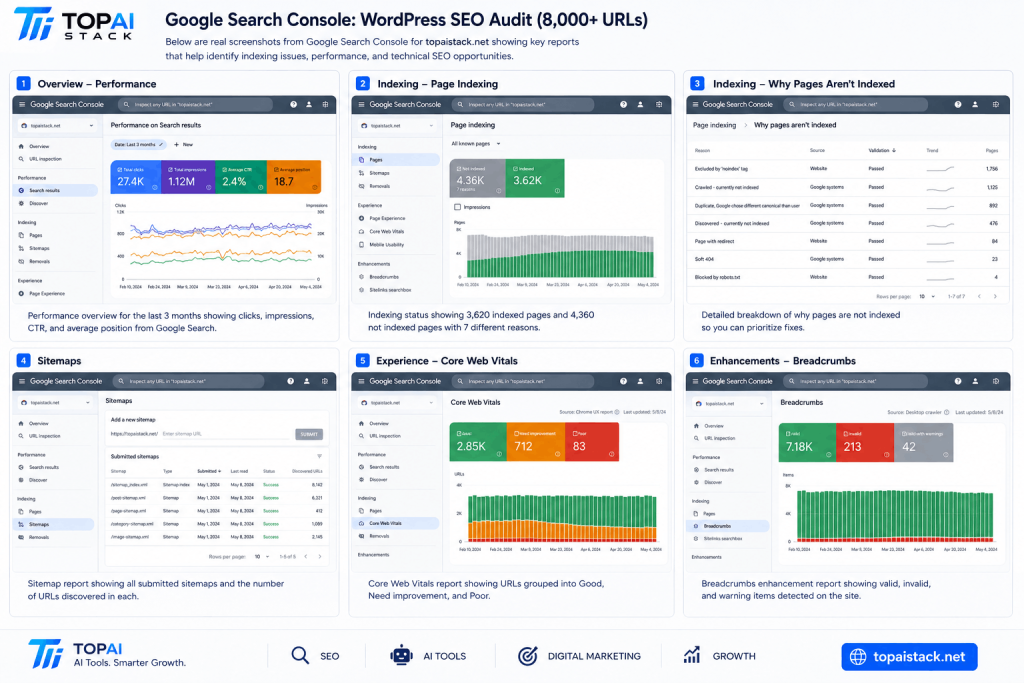
Use it for:
- Search performance
- Indexing
- Sitemap monitoring
- Search queries
- URL inspection
Google Analytics
Use it to understand:
- Traffic
- Engagement
- Conversions
- Landing pages
A website crawler
Useful for:
- URL discovery
- Status codes
- Redirects
- Canonicals
- Metadata
- Internal links
- Crawl depth
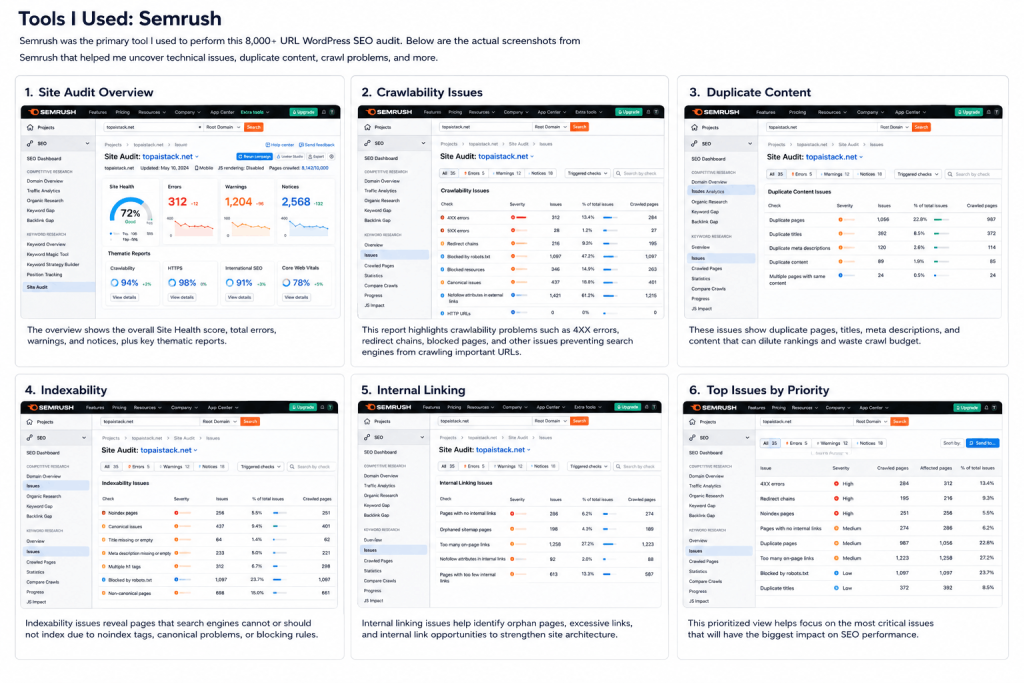
Semrush
Useful for combining:
- Site audits
- Keyword research
- Backlinks
- Competitor analysis
- Position tracking
Ahrefs
Useful for:
- Backlink analysis
- Organic keywords
- Content research
- Site auditing
PageSpeed Insights
Useful for performance and Core Web Vitals analysis.
The key principle is:
Use tools to collect evidence, then use SEO judgment to make decisions.
27. The 8,000+ URL Working Example
Now let’s bring everything together.
Imagine you start with a WordPress website containing more than 8,000 discovered URLs.
Your first step isn’t:
“How do I optimize 8,000 pages?”
It is:
“Why does this website have 8,000 URLs?”
After crawling, you might discover that the URL inventory consists of several different groups:
Core pagesBlog postsCategoriesTagsArchivesAttachment pagesRedirects404 URLsParameter variationsOther generated URLs
Now the audit becomes much easier.
Instead of thinking about 8,000 individual pages, you can think about URL systems.
For example:
System 1 — Blog posts
Potentially valuable.
System 2 — Categories
Potentially valuable if strategically designed.
System 3 — Tags
Potentially problematic if automatically generated.
System 4 — Attachment pages
Potentially unnecessary.
System 5 — Redirects
Need cleanup.
System 6 — Parameter URLs
Need appropriate handling.
This is the key lesson from large-scale SEO:
Don’t audit thousands of URLs one by one. Audit the systems that created those URLs.
That’s how you make a large WordPress SEO audit scalable.
28. Large WordPress SEO Audit Checklist
Use this checklist when auditing a large website.
Crawling
- Crawl the full website
- Export all discovered URLs
- Check HTTP status codes
- Identify redirect chains
- Find broken internal links
- Check crawl depth
- Identify orphan pages
Indexation
- Review Google Search Console
- Compare indexed vs non-indexed URLs
- Check noindex directives
- Review canonical URLs
- Review robots.txt
- Check sitemap coverage
Content
- Find duplicate content
- Find thin content
- Identify outdated content
- Identify overlapping search intent
- Review category pages
- Review tag pages
- Review author archives
- Review date archives
Technical SEO
- HTTPS
- Canonicals
- XML sitemap
- Robots.txt
- Redirects
- 404 pages
- Core Web Vitals
- Mobile experience
- Structured data
Internal Linking
- Identify orphan pages
- Improve important page links
- Review anchor text
- Reduce excessive click depth
- Build topic clusters
Prioritization
- Estimate SEO impact
- Estimate affected URL count
- Evaluate business value
- Estimate implementation effort
- Create a prioritized roadmap
WordPress SEO audit, WordPress website audit, technical SEO audit. AI SEO & Marketing.
29. Final Thoughts
Auditing a WordPress website with 8,000+ URLs can look overwhelming.
But the solution isn’t to inspect every URL manually.
The better approach is to understand the systems behind the URLs.
Start with crawling.
Then analyze indexation.
Review duplicate and thin content.
Audit categories, tags, archives, redirects, canonical URLs, sitemaps, and internal links.
Finally, combine SEO data with traffic, backlinks, and business value to determine what actually deserves attention.
The most important lesson is this:
Large-scale SEO isn’t about fixing the most errors. It’s about fixing the problems that matter most.
A website with 8,000 URLs doesn’t necessarily need 8,000 SEO optimizations.
It needs a clear architecture, useful content, strong internal linking, clean technical signals, and a prioritized strategy.
And when you approach the audit that way, a seemingly massive website becomes much easier to understand and improve. WordPress SEO audit, WordPress website audit, technical SEO audit.
Frequently Asked Questions
How often should I perform a WordPress SEO audit?
For a large website, perform a comprehensive audit at least periodically and run smaller technical checks continuously. Major redesigns, migrations, URL structure changes, plugin changes, or large content expansions should also trigger an audit.
How many URLs can a WordPress SEO audit handle?
There isn’t a practical rule saying an audit must stop at a particular URL count. The process should scale with the website. Large sites may require crawling, exporting, segmenting, and analyzing URLs in batches.
Is 8,000 URLs too many for a WordPress website?
Not necessarily. The important question isn’t whether the number is large. It’s whether those URLs are useful, discoverable, technically accessible, and aligned with the site’s SEO strategy.
Should I delete low-traffic pages?
Not automatically. Low traffic alone isn’t enough to justify deleting a page. Consider backlinks, impressions, rankings, conversions, search intent, internal links, and business value before making the decision.
Are duplicate pages a Google penalty?
Duplicate content isn’t automatically a spam violation. However, duplicate URLs can create unnecessary crawling and canonicalization challenges, so consolidating genuinely duplicate or near-duplicate content can still be beneficial.
Should I use robots.txt to block duplicate pages?
Not as a general canonicalization solution. Google explicitly recommends against using robots.txt for canonicalization because blocked URLs may still be indexed without their content being crawled.
Should every WordPress tag page be indexed?
No. Whether a tag page should be indexable depends on whether it provides meaningful value and serves a useful purpose for users and searchers.
How important are internal links?
Very important for large websites. Internal links help users navigate and help search engines discover and understand relationships between pages. Google recommends linking important pages from relevant pages using descriptive anchor text.
What is the most important part of a large SEO audit?
Prioritization. Finding 5,000 issues is less useful than identifying the 10–20 problems that affect the largest number of important URLs.
Conclusion
A large WordPress SEO audit should not be treated as a giant error report.
It should be treated as a decision-making system.
Discover the URLs.
Understand how they were created.
Determine which ones matter.
Find the technical and content problems.
Then prioritize the fixes based on impact.
That approach works whether you’re auditing 800 URLs, 8,000 URLs, or 80,000 URLs.
And if you’re building a large WordPress website today, the best time to establish a clean URL architecture and SEO process is before the site grows into a technical mess.
Want more practical SEO, AI tools, and digital marketing guides?
Visit Top AI Stack at topaistack.net.
WordPress SEO audit, WordPress website audit, technical SEO audit, large website SEO audit, SEO audit checklist, WordPress technical SEO, SEO audit for large websites. WordPress SEO audit, WordPress website audit, technical SEO audit, large website SEO audit, SEO audit checklist, WordPress technical SEO, SEO audit for large websites. WordPress SEO audit, WordPress website audit, technical SEO audit, large website SEO audit, SEO audit checklist, WordPress technical SEO, SEO audit for large websites. WordPress SEO audit, WordPress website audit, technical SEO audit, large website SEO audit, SEO audit checklist, WordPress technical SEO, SEO audit for large websites. Best AI Tools.


